Content
In recent years, making Google Ads work has become ever more difficult: rising CPCs followed a surge in competitors as ever more SaaS products were launched in crowded spaces.
Still, for many B2B SaaS companies, between 40 and 80% of performance marketing spend goes to Google Ads. At YOYABA, we are therefore managing 7-digit marketing spend on Google Ads every single month.
This is why it’s so important to get it all right in order to make this channel work as hard as possible. And many Heads of Demand Generation and VPs of Marketing struggle to understand how exactly paid search for high-ACV B2B SaaS companies can be made to work.
In this article, I will cover the entire trinity of:
- Conversion tracking
- Keyword targeting
- Landing pages and conversion rate optimisation
At the end, I will also briefly show when I would advise against running Google Ads for your SaaS company.
But first let’s run the maths of what a click is actually worth to your business and what goals and expectations you can reasonably have.
Main challenges I surface when I audit new client accounts:
- Insufficient conversion tracking: too little data for the algorithm to optimise for
- Lack of search term hygiene leading to wasted spend: at €40–80 a click, one bad search term costs serious money, especially if it accumulates across campaigns
- Subpar landing pages that never convert the click
TL;DR:
How to successfully run Paid Search for high ACV B2B SaaS
- What a click is worth: At high ACV, the goal isn’t the lowest CPC. You derive your maximum sustainable CPC from your unit economics: ACV, gross margin, payback target, close rate and landing page conversion rate.
- Conversion tracking: Smart Bidding needs enough signal. Feed CRM stages like Lead, Opportunity and Closed Won back into Google Ads with values instead of optimising for form fills only. If the volume isn’t there, Maximize Clicks with a CPC ceiling is the better choice.
- Keyword targeting: Always run brand, always test competitor alternatives and put 60–80% of the budget into high-intent keywords. Report brand and non-brand separately, because blended CAC hides unprofitable high-intent campaigns.
- Search term hygiene and AI Max: At €40–80 a click, regular search term hygiene is non-negotiable. For now, AI Max only makes sense as a narrow, closely monitored experiment.
- Landing pages: Ongoing CRO is the third pillar. That means pages that match the search query and the ad, a strong hero section and tests with at least 100 clicks per version.
- When paid search doesn’t fit: when there isn’t enough search volume, the category has no established search language yet, or the budget sits below the signal floor.
What a click is worth: customer acquisition calculations for high-ACV B2B SaaS companies
In modern Google search ads for B2B SaaS, you do not optimise for the lowest CPC possible.
What you should optimise your search setup for is a target payback period (or spend-to-pipeline ratio), based on funnel conversion rates all the way from Lead through MQL and SQL to Opportunity and Closed Won.
Ultimately, your paid search ads need to match the lifetime value you can expect (or whatever other goal your business currently has – optimising for efficient growth obviously works differently than scaling as quickly as possible).
Sales costs as well as marketing costs and media spend need to add up.
Revenue growth is the sole goal.
See how Suiteify cut cost per SQL by 41%, tripled ROAS and reached a 1:4 spend-to-pipeline ratio with YOYABA.
Read the full case study
So in the end, a click is worth whatever your economics can sustain, and that number is derived, not looked up.
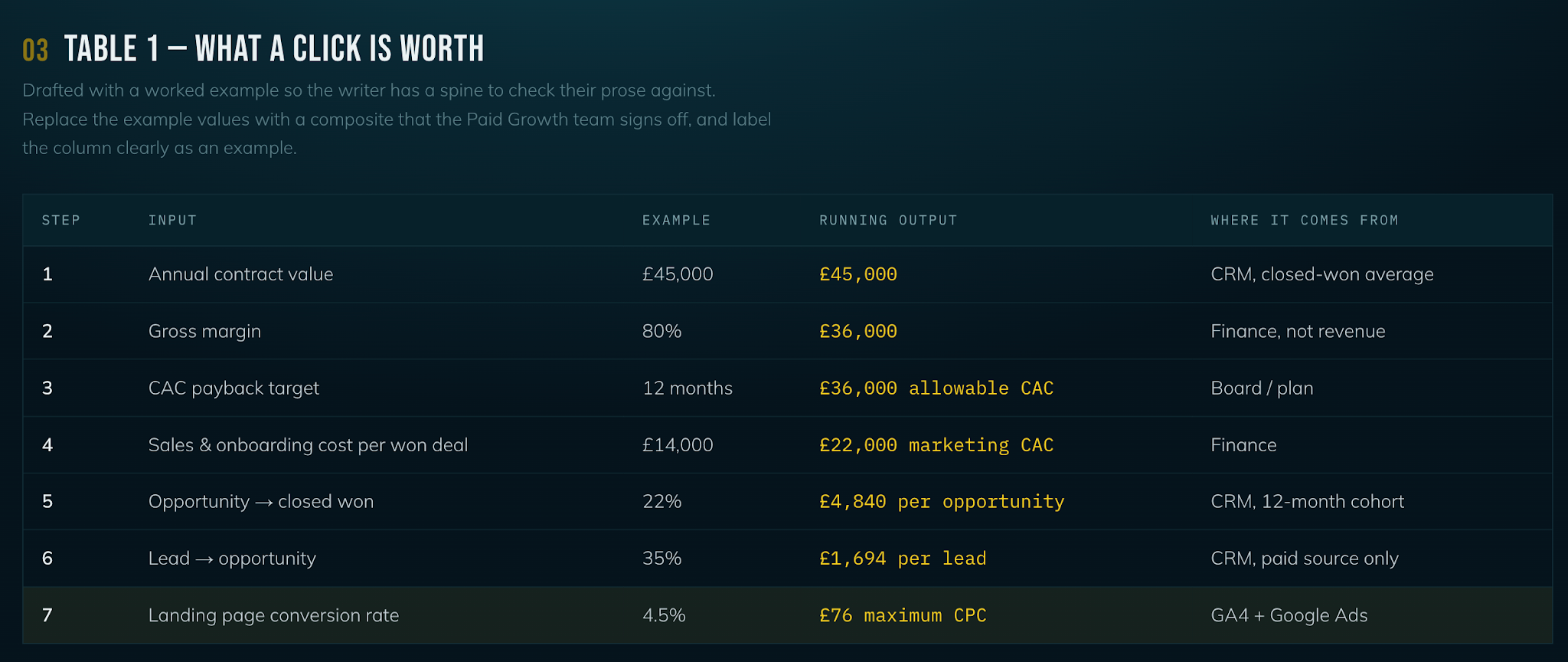
Work down from annual contract value through gross margin, your CAC payback target, close rate, and landing page conversion rate.
The output is a maximum sustainable cost per click, given a certain landing page conversion rate.
In essence, this means that alongside CPC, your conversion rate is a critical part of the equation. This is why landing page optimisation and testing are essential (more on that later). Google Ads success also depends on in-funnel conversion rates from Lead to Opportunity to Closed Won.
Below is a table showing how the maths works out. Feel free to try the calculator yourself.
B2B SaaS benchmarks
CPCs for high-intent keywords in B2B SaaS can range from €10 to €30+ depending on industry and market. Benchmark SaaS conversion rates from click to lead for search ads are 1% and above. Unbounce states even higher benchmarks, though without specifying the traffic source.
Now, once we have established what CPC we can afford to meet the goal we set, let’s move one level deeper to understand the three main contributors to performing Google Ads campaigns.
Conversion tracking to feed a sufficient amount of data
In the age of AI, feeding the Google Ads algorithm the right data is essential to set your Google Ads account up for long-lasting success.
Smart Bidding learns from conversions, and Google's own guidance points to a meaningful conversion count (generally around 15–30 conversions per month, ideally per campaign) in the trailing thirty days before Target CPA or Target ROAS can price an auction reliably, let alone maximise conversions.
A high-ACV account producing thirty demo requests a month, split across six campaigns, is asking the algorithm to bid on five data points. And we all know, more often than not, we cannot feed enough (demo) data back to the ad account. This regularly leads to inflated CPC, especially when automated bid strategies are in place.
The default conversion tracking setup today makes the CRM a core part of the account.
That is, EVERY B2B SaaS company running on HubSpot needs to set up the following:
Lifecycle stage change → Conversion firing and sending back to Google Ads
Set this up for at least the three most important stages along the lead journey: Lead, Opportunity, Closed Won. Doing so literally requires three clicks in the standard HubSpot setup. If in doubt about tracking, workflows or attribution, get in touch with our RevOps team.
The north star is to feed the entire customer journey into Google Ads, from Lead to Closed Won.
Of course, if you happen to have customised lifecycle changes per product line or very loose triggers for lifecycle stage changes, the setup becomes trickier.
Without CRM signals, however, you are optimising for nothing but vanity metrics (we see this all the time): demo form submissions at best, with no insight into lead quality, and irrelevant soft conversions at worst, e.g. 30-second page visits.
Client example:
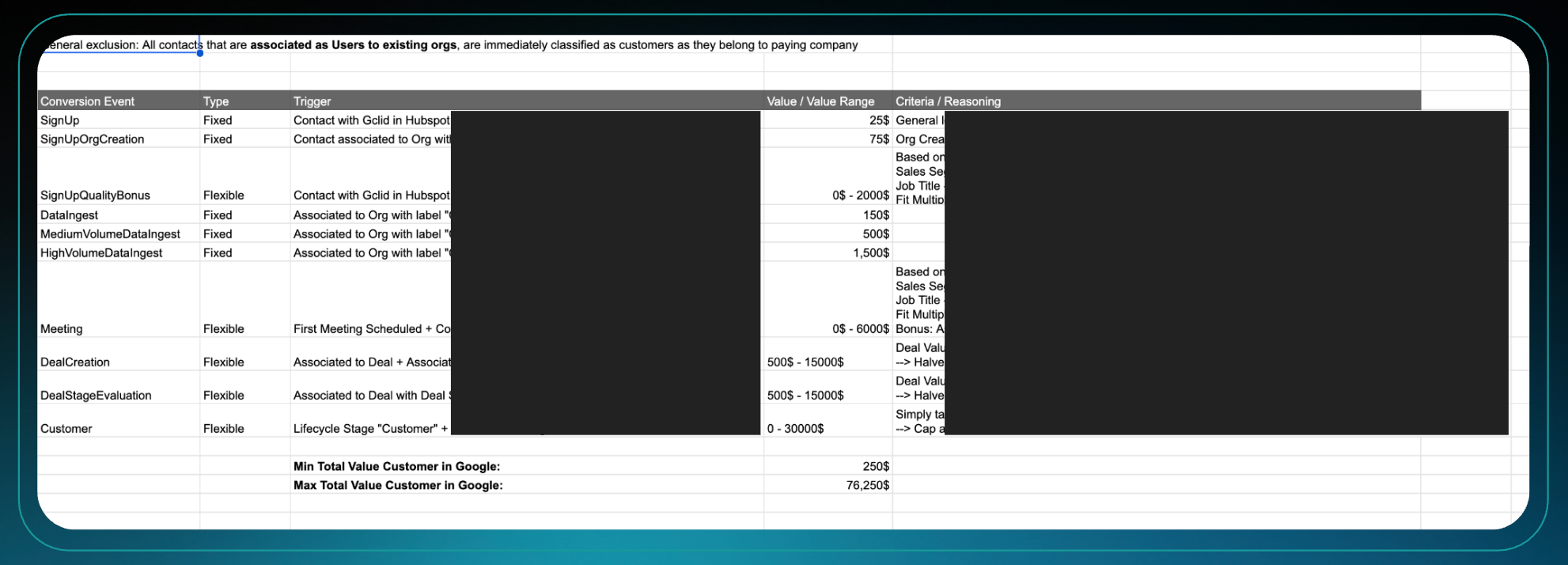
For one client, we set up a total of eight conversion events across the lead funnel. They range from product sign-ups and demo form submissions through activated users and created deals all the way to won business. We feed dynamic conversion values back to Google Ads to develop a customer persona just for Google.
So when building your conversion tracking setup, follow these steps:
- Choose one mid-funnel action that is high enough in volume and close enough to revenue, such as a qualified demo or a genuine product-usage signal, not a raw form submission.
- Weight conversions through value-based bidding with dynamic values per conversion stage. Watch out: the combined value of all conversion stages should add up to the estimated contract value the lead or deal generates.
- Fall back to Maximize Clicks with a CPC ceiling when conversion volume drops below the minimum. It beats a data-starved Target CPA, because a manual ceiling is at least a decision rather than a guess based on five conversions.
Client example:
On a B2B SaaS account, we moved off a data-starved automated strategy onto Maximize Clicks with a CPC ceiling. Cost per click fell 42% and clicks rose 214% at flat spend. On a second account the same move took brand CPC from roughly €3.04 to €1.17.
Some additional remarks:
- The conversion window: uploads outside the click-through conversion window are rejected. Set the attribution window to the maximum of 90 days; if the sales cycle is longer than the window, the primary bidding target has to be a mid-funnel stage (usually that equates to SQL/Opportunity stage).
- Time zones: upload feeds are handled in UTC while the account usually is not. A wrong offset misdates or silently rejects conversions uploaded via API.
- Consent banners eat click identifiers: measure your actual cookie banner capture rate and check for potential improvements (in DACH we expect at least 60–70% marketing consent rate; top performers reach rates as high as 95%).
- Supply email addresses with conversions where possible, for even higher match rates on Leads and MQLs+ and to fuel Enhanced Conversions for Leads, which lets Google model conversions even better and ultimately increases the data volume available for optimisation.
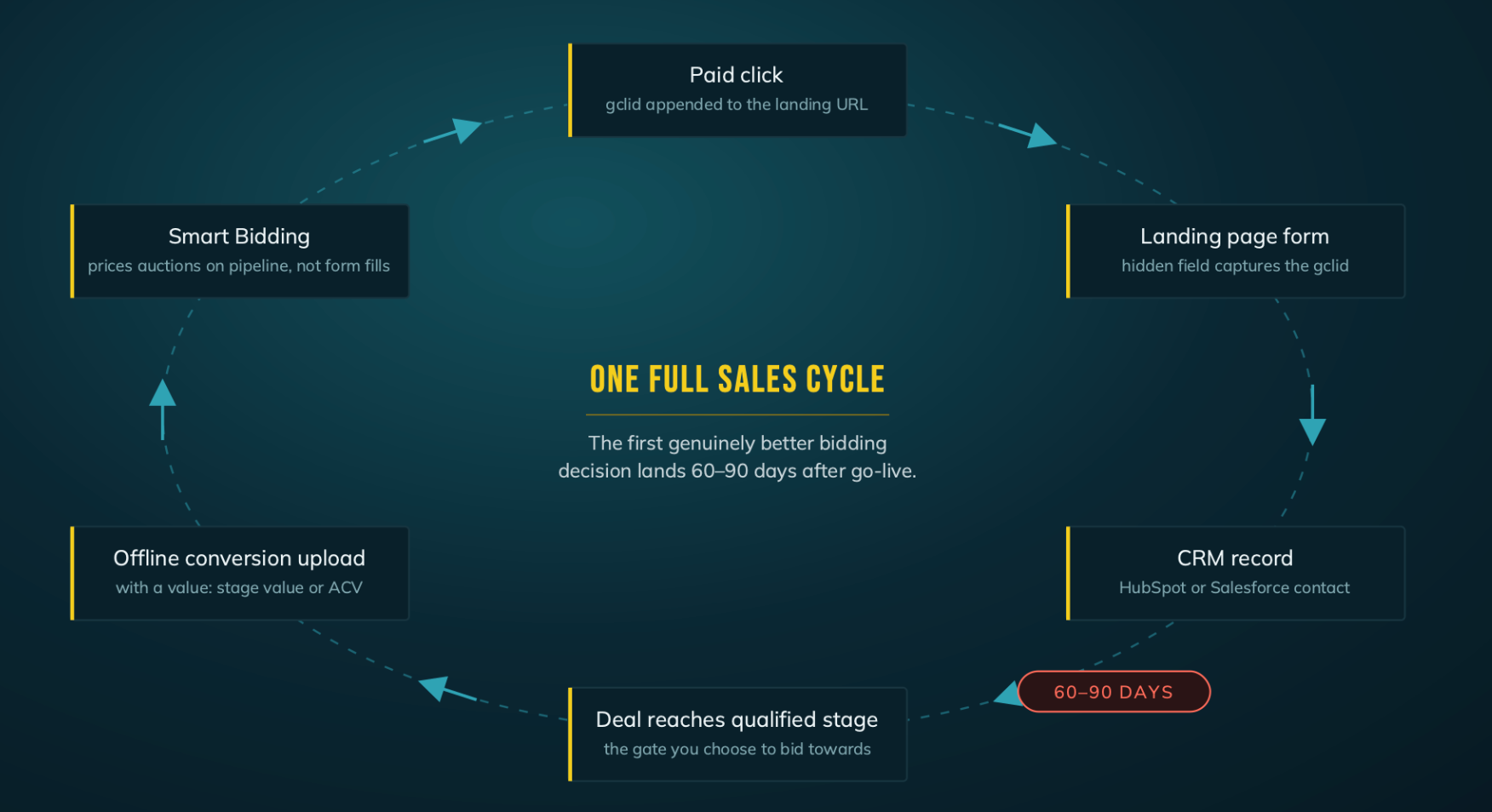
How do you connect Google Ads to a pipeline in your CRM?
Connecting your CRM to Google Ads is as easy as a couple of clicks (given you operate on HubSpot).
Before you start make sure that:
- Auto-tagging is switched on in Google Ads.
- The HubSpot tracking code runs on every landing page.
- Your forms send submissions to HubSpot, either as HubSpot forms or through collected forms.
Setup:
- In HubSpot, go to Marketing › Ads and click Connect account. Choose Google Ads and log in with a user who has admin access to the ad account.
- Leave auto-tracking on. HubSpot will then record the campaign, ad group and keyword behind each new contact.
- Open Ads settings › Events and click Create event.
- Choose the trigger. This can be a lifecycle stage (SQL, Opportunity) or a deal stage (for example, “Demo held”).
- Give the event a value. Average deal size × close rate from that stage works well as a proxy.
- In Google Ads, open Goals › Conversions. The HubSpot events show up as new conversion actions. Set any pipeline stage as primary and any form fill as secondary at the start.
For every other CRM, the flow from click tracking to the CRM is the same, but the setup requires manual intervention.
The click identifier Google attaches to every paid visit (GCLID) should be captured in a hidden form field, stored on the contact record in HubSpot or Salesforce, and uploaded back to Google Ads via the Data Manager API, together with a conversion value, once the deal reaches a stage that matters. Smart Bidding then optimises towards pipeline rather than form fills.
In need of support to set up flawless conversion tracking for your paid ads? Just reach out to our paid media experts.
Once the data foundation is set, you may move on to looking at keyword targeting.
Keywords as the baseline for proper targeting
Which keywords you bid on is equivalent to the targeting you turn on.
Everyone knows that.
What many performance marketers often do not understand, however, is the following:
- That regular search term hygiene is imperative for well-performing campaigns
- How bad the impact of broad match can be
- That AI Max is a complete waste
Before optimisation comes into play, though, how do you select the right keywords to start off with in the first place?
Here’s the keyword cluster overview that we lean on for both newly established and mature Google Ads accounts:
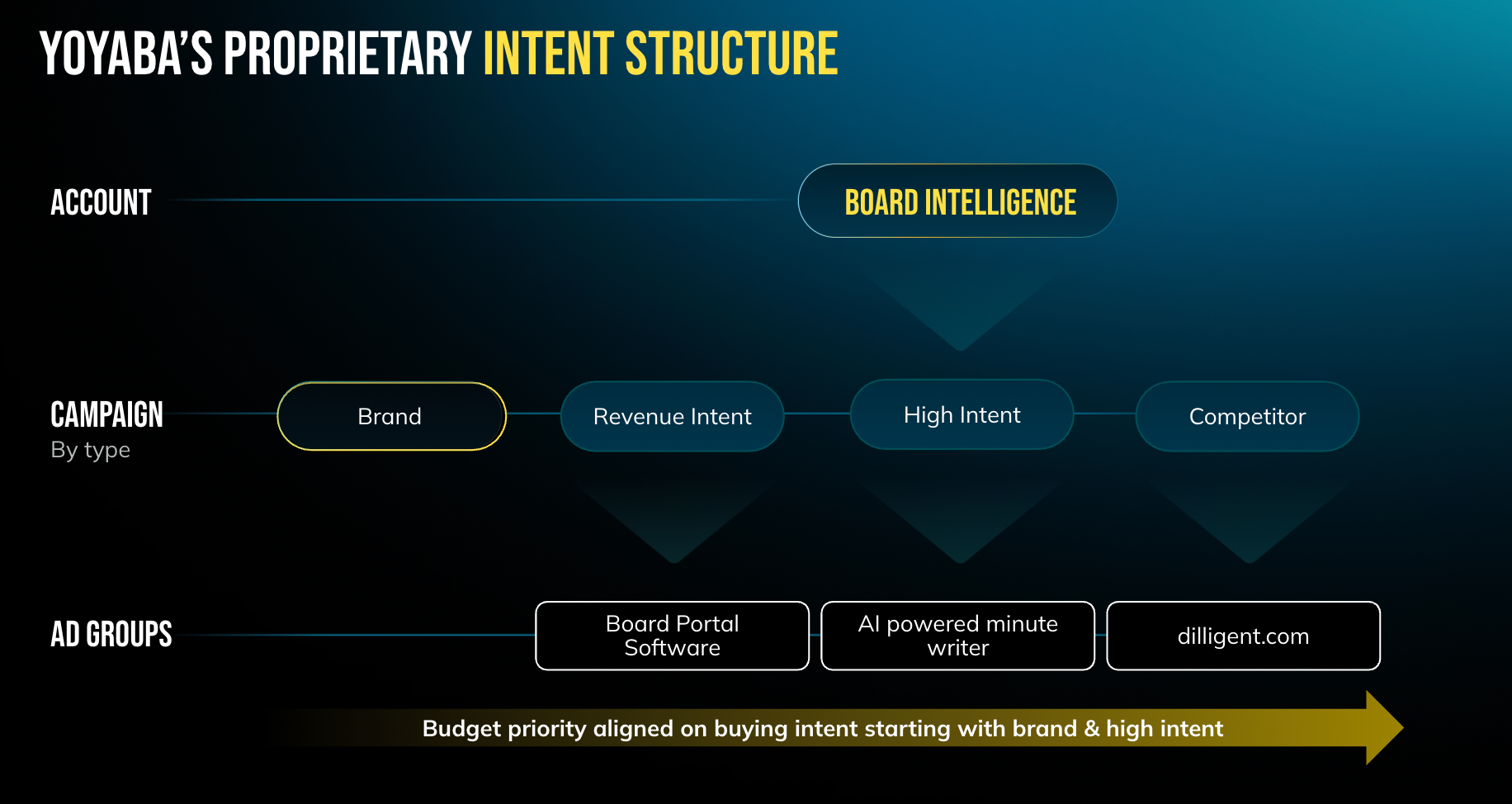
Brand terms: always run them. They are the backbone of every Google Ads account and feed the account its initial signals, so that it can start learning. Especially in competitive markets, you need to defend brand exposure, otherwise competitors can easily eat into your impression share.
Competitors: always test them, provided you do deep-dive research (which you should always do) and benchmark your company against a representative set of competitors (e.g. a similar revenue band, comparable feature sets or TAM). This cluster usually ends up either as a top-performing campaign cluster or not performing at all, and it depends heavily on the competitor set, the campaign approach and the landing pages (more on that shortly). Start with a dedicated focus on “competitor name + alternative” searches and avoid bidding on the competitor’s brand name outright. Except in rare cases, users searching only for the brand do not have sufficient intent to convert through a competitor ad.
High intent: main focus, with 60–80% of the budget. This is the cluster that is meant to drive net-new growth for your company.
What do I mean by high-intent keyword clusters?
This relates to keywords that signal high buying intent, usually longer search terms (2–3+ words) containing clear modifiers such as “software”, “tool”, “platform”, “app”, etc.
Another type of high-intent search I like to add is searches for integrations. For example, if you offer ETL software, prospects might search for “tableau connectors”, which is a pretty bottom-of-funnel search, given that the user is researching specific solutions you might offer. In this instance, “Tableau” further indicates a potential mid-market to enterprise user, since it is a tool that is rarely adopted by startups or small and medium-sized businesses.
Brand vs. high intent: why blended CAC misleads
Brand campaigns capture demand that already exists. Someone typing your company name has usually heard of you through a podcast, a LinkedIn post, a referral, or a sales conversation. Google didn't create that demand. It just collects it. Brand success is built in other channels.
High-intent campaigns reach buyers who are looking for a solution but haven't picked you yet. This is the cluster that actually grows a company through Google search.
Here's what I frequently see in audits: Google Ads gets judged on blended CAC or payback across the whole account, and on that view the channel looks profitable. One layer deeper, the cheap CAC comes almost entirely from brand, while the high-intent campaigns sit well above target.
That's where the trouble starts. Leadership sees a profitable channel and wants to scale it. But the brand campaign can't be scaled: its volume is capped by how many people already search for you. The extra budget flows into high intent, which was never profitable in the first place. So “profitable scaling” stalls, and CAC climbs with every extra euro.
The fix: report brand and non-brand separately, with separate targets. Judge high intent on its own CAC-to-payback ratio, because that number decides whether Google can grow your business.
Optional: mid-intent exploration.
Add this to the search mix only if the budget allows and high intent is saturated (usually not the case in most markets, nor with a monthly spend below €20–30k).
Mid-intent searches range from “how to ...” queries to searches for guides, reports or guidelines on specific topics. For example, “e-invoice checklist” would fall into this category.
Side note:
Personally, I like to run a fresh round of keyword research at least monthly to find potential expansion beyond the current set. Common triggers include new feature launches, organic advancements or new landing pages that clients did not have before.
Once the keyword targeting architecture is in place, it is imperative to follow strict and recurring search term hygiene. Especially in paid search for high-ACV B2B SaaS companies, leaking irrelevant search terms can rack up tremendous excess costs and waste significant amounts of money (e.g. “best attribution software” at €380 CPC).
On top of that, it delays the time needed to collect a sufficient amount of data to gauge keyword performance or landing page effectiveness. If half of the targeted keywords lead to entirely irrelevant search terms, measurement and reporting make no sense at all.
Side note on AI Max
Every single Google rep is pushing AI Max like crazy these days.
Based on around €250k spend on AI Max across accounts in 2026, I see the following:
- It eats into brand campaigns. If left unattended or set up incorrectly, AI Max will hunt for the easiest conversion drivers first. Naturally, these are brand terms, which artificially inflate the performance of your AI Max experiment.
- It drives REALLY irrelevant traffic at scale. Imagine targeting “invoice software for freelancers” but ending up with traffic for “how do I write an invoice”.
- Overall visibility into matched search terms is very low. Google reps claim that AI Max covers long-tail keyword searches, but the search terms usually reveal only 3–4 words, not more.
Now, this is not to say AI Max will never improve. Ultimately, AI Max is meant to be the entry point for showing ads in AI Mode, so it seems there is no way around it sooner or later.
At this point in time, though, I would not recommend running it to anyone except as a very narrow and closely monitored experiment.
With the data foundation and keyword targeting clear, let’s move on to the third pillar: landing pages.
Landing pages to boost conversion rates
The third pillar of successful Google ad campaigns is fuelled by ongoing conversion rate optimisation. In order to make your ad spend work hard, it is essential to invest in ongoing landing page testing.
This includes:
- Regularly creating new pages that fit the content
- Optimising existing pages (with a particular focus on the hero section above the fold)
- Ideating ways to entice users to a) engage with your landing page content and b) choose from different options depending on their intent
For example, one of our clients has built out more than 10 dedicated pages comparing their solution against their competitors’ products. A couple of things stand out:
- The targeted keyword is mentioned prominently above the fold, right in the H1 of the page.
- Users can choose their conversion path: either sign up for the free trial, which leads them right into the product, or book a demo with the sales team right away.
- The content dives straight into an honest side-by-side comparison of both solutions. There is no sugarcoating, only a comparison that is as useful as possible to the person browsing the page.
Safe to say that we attain above-benchmark conversion rates with this setup.
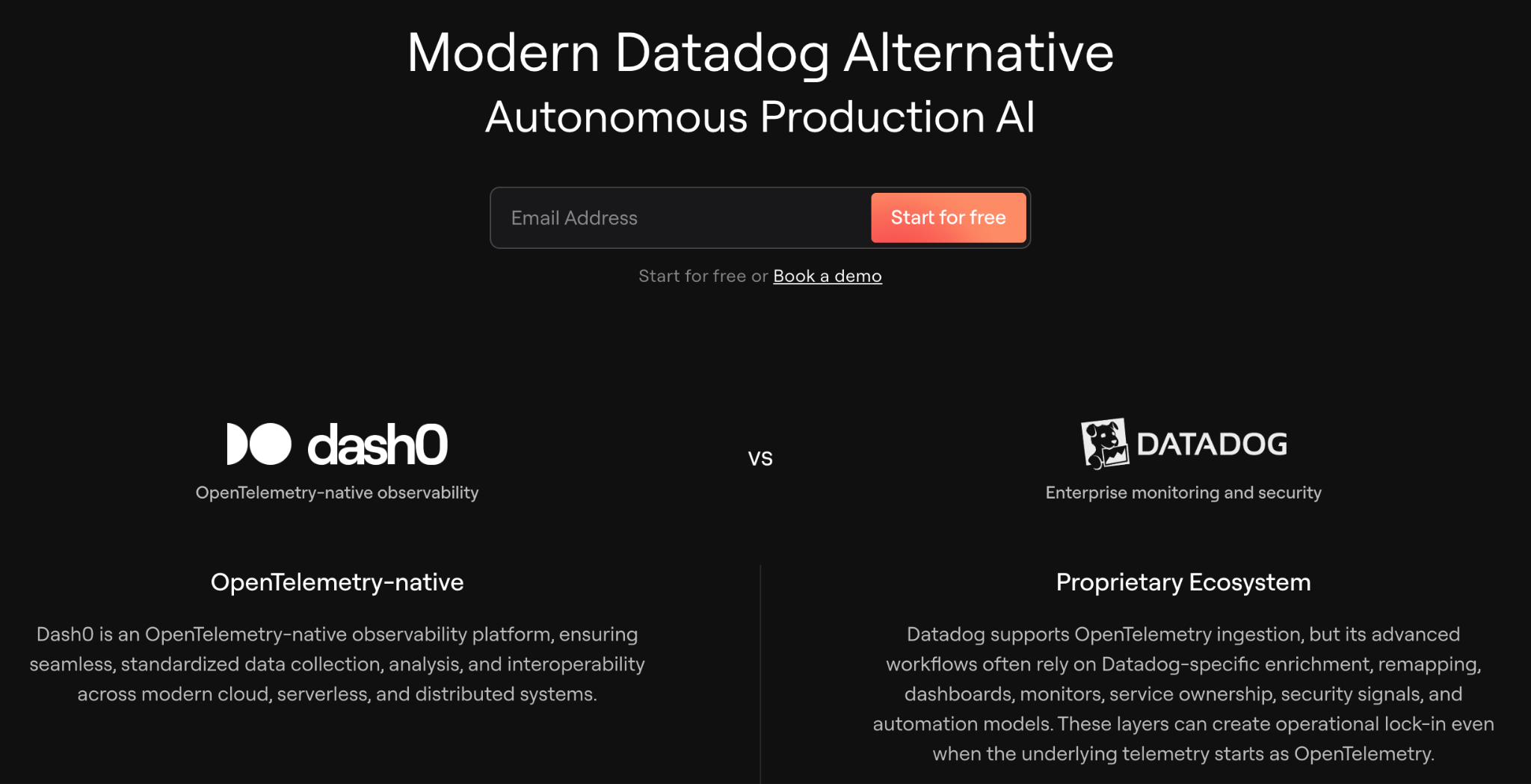
Iterating on that, we experiment with engaging, interactive elements for website visitors. In this case, we developed an interactive calculator that gives users a better understanding of the pricing upfront, enabling them to educate themselves without any sales touch.
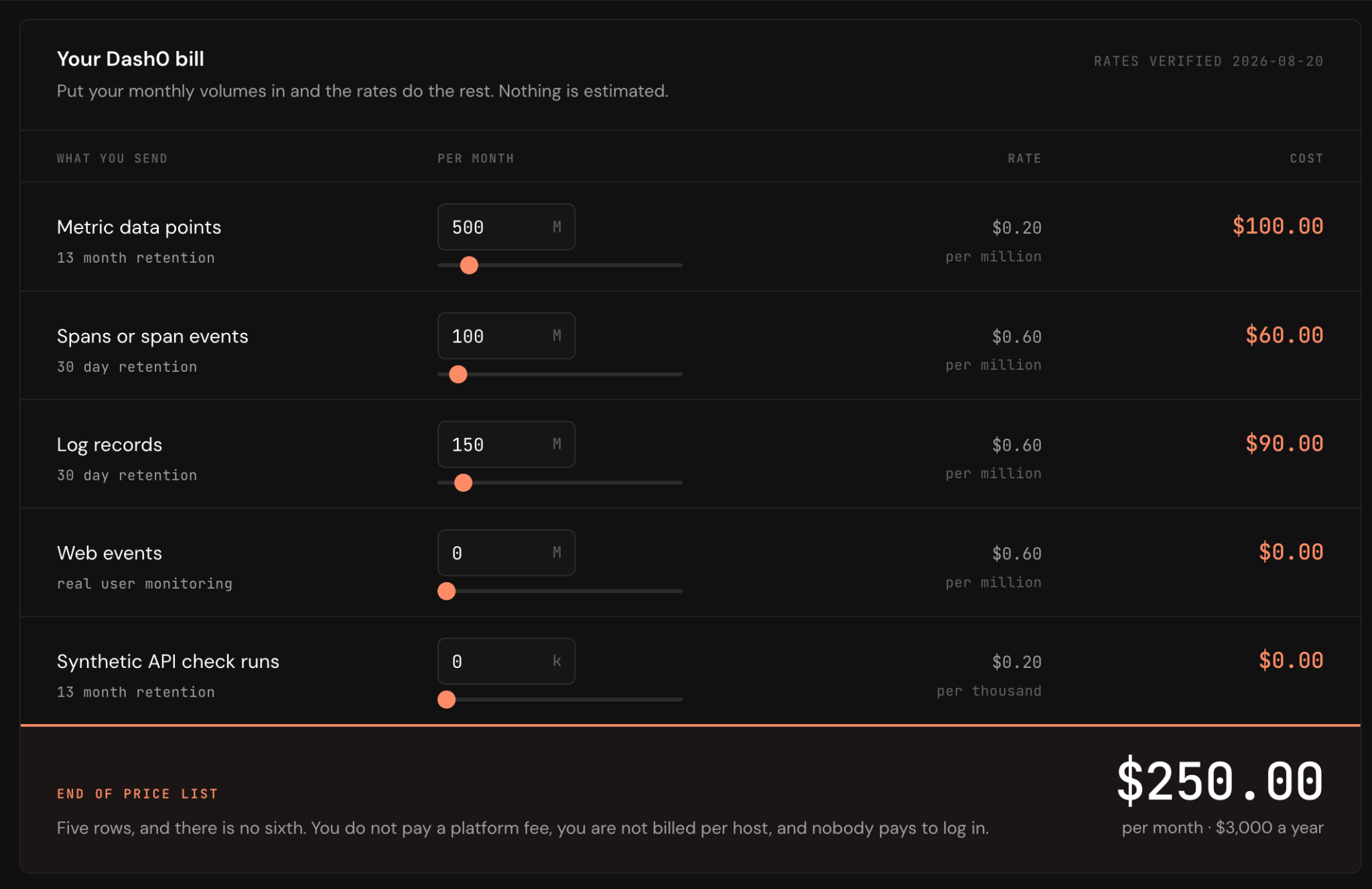
We run iterations like this on a monthly basis for our clients. Of course, the exact rhythm depends heavily on the ad spend at hand. For experiments to reach statistical significance, we aim for at least 100 clicks per version, ideally more.
How should B2B SaaS paid search campaigns and accounts be structured?
At YOYABA, there is a straightforward nomenclature we follow to set up paid search campaigns. This is how we get there:
- Conduct deep CRM research
- Uncover campaigns and keywords driving:
- Revenue
- Opportunities
- MQLs
- Expand on previously tested keywords through fresh keyword research (focused on competitor clusters and high- and mid-intent searches where applicable)
Based on that, we set up a search campaign structure where:
- Revenue intent is funded first and to the maximum
- Opportunity intent is funded second
- High-intent keyword exploration gets 20–50%+ of the budget (depending on past revenue and opportunity data from the previous clusters)
- Brand campaigns get around 20% of the budget
- Competitor campaigns get around 20% of the budget

When kicking off new campaigns, I like to start with Maximize Clicks and a CPC cap, so that campaigns start collecting data immediately. As soon as sufficient conversion data has accumulated, we transition to Maximize Conversions or even Target CPA bid strategies.
As B2B SaaS buying behaviour is seasonal by nature and conversion volumes can be very low, there are times when we switch back to an earlier bid strategy, depending on the data foundation.
Of course, once search has been set up, we add Display (retargeting), YouTube and Demand Gen, one at a time.
{{cta}}
Lorem ipsum dolor sit amet
Lorem ipsum dolor sit amet, consectetur adipiscing elit. Suspendisse varius enim in eros elementum tristique.
Expensive clicks, but hardly any pipeline?
Our paid media experts connect your CRM to Google Ads, clean up your keyword architecture and build landing pages that turn expensive clicks into qualified opportunities.
THe Bottom Line
As becomes clear, Google Ads success depends on ongoing testing, expansion and experimentation, as well as very close monitoring and continuous optimisation.
Once the economics are in place, you can work your way along the entire funnel to understand under which circumstances your setup is profitable.
As outlined in this article, you need to work your way from tracking and data foundation through keyword targeting to ongoing landing page optimisation. There are certainly many more levers to pull to optimise your paid search setup, but 80% of the results start with these basics.
When does paid search not fit a high-ACV B2B SaaS business?
Paid search is usually not a good fit in three cases:
- Not enough addressable volume. If the top twenty commercial terms in a category total only a few hundred searches a month in the primary market, paid search is at best a supporting channel.
- No category language. Paid search captures demand but does not create it. If buyers have no words for what a product does, the budget is better spent on demand creation.
- Budget below the signal floor. Below the floor, the spend buys noise, and that noise is too thin to interpret.
How can a B2B SaaS company tell whether paid search fits its economics?
Four checks answer this, in order:
- Is there volume? Count the monthly searches for the category’s top twenty non-brand commercial terms in the primary market.
- Can the click be afforded? Derive the maximum sustainable CPC with the calculator above. If the maximum CPC sits below the market’s average CPC, paid search does not fit.
- Can the signal floor be reached? Target opportunities per month multiplied by the allowable cost per opportunity gives the minimum viable monthly budget.
- Can the loop be closed? If nobody owns a click ID field in the CRM within ninety days, the programme will be judged on cost per lead indefinitely.
Your questions answered
Does Google Ads work for enterprise B2B SaaS?
Yes, where the category has established demand (as measured in search volume per month for key category terms) and the economics support the click price. It works as a demand capture channel for high-intent leads, not as a volume lead source for low-intent whitepaper leads.
What is a good cost per lead for high-ACV B2B SaaS?
There is no useful benchmark. The right ceiling is derived from ACV, gross margin, close rate, and payback target, and at €45k ACV a four-figure cost per lead can be entirely rational.
How much budget does paid search need to work in B2B SaaS?
Enough to produce a stable monthly opportunity count. Multiply your target opportunities per month by your allowable cost per opportunity; below that figure, the account cannot generate enough signal to be interpreted.
Should high-ACV B2B SaaS use Performance Max?
Not as a primary structure. Performance Max needs more conversion signal than most high-ACV accounts produce. Revisit it only once offline conversions are flowing, with brand excluded.
How do you connect Google Ads to the pipeline in the CRM?
Capture the click identifier in a hidden form field, store it on the contact in HubSpot or Salesforce, and upload it back as an offline conversion with a value when the deal reaches a qualified stage.